Installing Vendor plugins with npm and Gulp
Follow this 4 easy steps to install 3rd party plugin and use it in
your JoinLesson based project:
-
Open your Terminal window and navigate to the root directory of
your project (where you package.json file is located).
-
Run npm install <package name> --save. This
command does two things: downloads package to
node_modules folder and writes dependency to your
package.json file inside
dependencies object.
-
Run gulp vendor. This command will clean
dist/vendor folder and move all the dpendencies
that are listed in package.json file in
dependencies object to
dist/vendor including your newly downloaded
plugins.
-
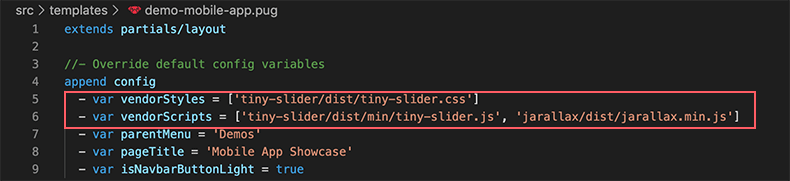
And last step is to link to plugin's scripts and styles in your
document. If you use Pug templates you can link to plugin using
array of dependencies. See the screenshot below:
 Buy
now
Buy
now